Loom alternative for AI coding: transcript only vs marks, frames and a closed loop (2026)
Loom is great for people. Your coding agent can even read a Loom now. The question is what it gets when it does, and whether that is enough to build the right fix.
By Vidmatic · · 5 min read
Loom is how a lot of teams explain things. A two-minute video beats a wall of text, and nobody has to schedule a meeting. So when the person on the other end of the handoff is a coding agent instead of a teammate, the obvious move is to send it the Loom.
That move works better than it did a year ago. It still leaves out the part a coding agent needs most.
Your agent can already read a Loom
Credit where it is due. The Atlassian Rovo MCP server now includes Loom tools: an agent can fetch a video's metadata and, optionally, its transcript, comments, AI briefs and action items, list your videos, and even comment on one. Atlassian announced them as part of the Rovo MCP v2 preview, available for Loom workspaces linked to an Atlassian site.
If your team already lives in Jira and Confluence, that is a real reason not to switch anything. For a recorded meeting, a design walkthrough or a "here is how the export works" explainer, the transcript is the content, and your agent can now read it.
What a transcript leaves out
A bug report recorded for a person sounds like this: "So if I click here, this total is wrong, it should be this one." A person watching sees the cursor. An agent reading the transcript sees three pointing words and no pointer.
That gap is not a Loom problem. It is a transcript problem, and every transcript-only path has it. The agent gets your words in order and has to rebuild what was on screen from them. It will pick an element, with confidence, and sometimes it will pick the wrong one.
What fixes it is keeping the pointing. In Vidmatic you record with the Chrome extension and draw on the page while you talk: circle the element, cross out what should go, write the right value by hand. Each mark is stored with the second you started drawing and the second you confirmed it, so it lines up with the sentence you were saying.
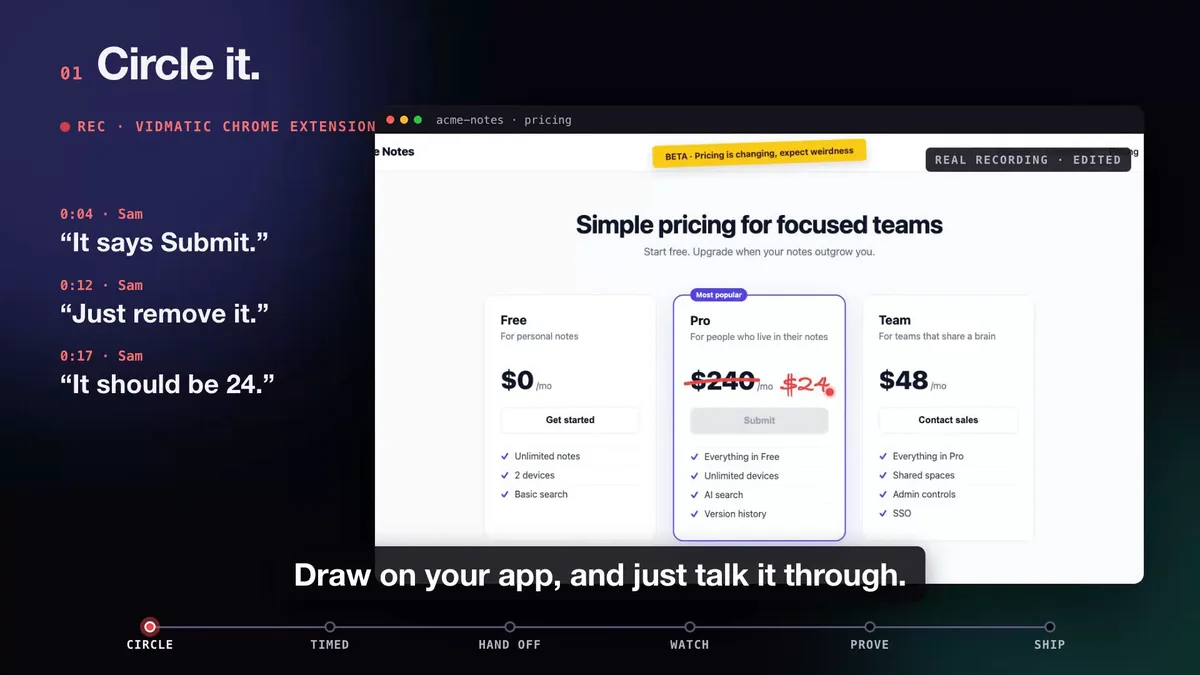 Three spoken asks at 0:04, 0:12 and 0:17, each with its own mark. The mark is the pointer a transcript drops.
When your agent reads that recording over MCP it gets the timed transcript, every mark, and an image of the screen with each mark drawn on it. When your words and your drawing disagree, the drawing wins.
The other half: what happens after the agent reads it
Reading the recording is the input. The reason to record for an agent is the output: the right fix, shipped, and some way to know it is right. That is the part we built Vidmatic around, and it is where the loop differs from a transcript-only recorder, Loom included:
- One grounded issue. Paste one line from the recording's Give this to your agent panel. Your agent reads the recording, searches your repository on your machine, and files one GitHub issue with one row per ask and the file and line where each lands. The step by step is in Show your coding agent the bug, and the use case has its own page: screen recording to GitHub issue.
- A live view of the work. Your agent reports each stage, plan, build, review, ship, to Agent Workstreams as it finishes, with a record of what it decided and why.
- Video proof. On request it records the bug before the fix and the same path after it, and Vidmatic pairs the two into one before and after video.
 Every word and every mark pinned to the second. This is what the agent reads.
Loom and its alternatives for AI coding, compared
Here is how the options compare for the job of handing a screen recording to a coding agent, as of October 2026, based on each product's own public pages.
| Loom via Rovo MCP | Clipy | Builder.io Clips | Vidmatic | |
|---|---|---|---|---|
| What the agent reads | Metadata, transcript, comments, AI briefs, an MP4 download link (Atlassian) | Summary, transcript, clicks, key-moment frames (Clipy) | Transcripts, frames and browser diagnostics from a share link (Builder.io) | Timed transcript, every drawn mark with its time, images of marked regions |
| Hand-drawn marks on the recording | Not listed | Not listed | Not listed | Yes |
| Console and network capture | Not listed | Partial | Yes, browser diagnostics | No |
| Self-hostable | Not listed | Not listed | Yes, open source | No |
| Agent files one issue against your code | Not listed | You ask the agent to | You ask the agent to | Yes, one line |
| Live view of the agent's stages | Not listed | Not listed | Not listed | Yes |
| Before and after proof | Not listed | Yes, BEFORE and AFTER chapters in one recording (Clipy) | Not listed | Yes, two recordings paired per issue |
Pick something else when it fits better. Stay on Loom if your recordings are for people first and Rovo MCP already connects your agent. Pick Builder.io Clips if you want open source and browser diagnostics in the share link. Pick Clipy if you want an agent-readable recording and agent-recorded proof, without the issue-filing and live-workstream loop.
Pick Vidmatic when the bug is in where you are pointing, and when you want the loop closed: show it once, watch the agent work, and get video proof it shipped. The full run is filmed in Circle it. Say it. See it shipped., and the product side of it is screen recording for AI coding agents.
Try it on your next bug
Connect once with the command on the screen recording MCP server page and sign in in the browser. Record the next thing that annoys you, circle it, say it, and paste the line from the recording's Give this to your agent panel. Keep Loom for everything else.
Frequently asked questions
- Can my coding agent read a Loom video?
- It can read a Loom's text. The Atlassian Rovo MCP server lists a Loom tool that returns a video's metadata and, optionally, its transcript, comments and AI briefs, for Loom workspaces linked to an Atlassian site. It does not serve frames. It can hand the agent a download link for the MP4, which Claude Code still cannot watch.
- Why is a transcript not enough for a UI bug?
- Because the words that matter in a bug report point at the screen. This button, that total, over here. Without an image of what you were pointing at, the agent has to guess which element you meant.
- Do I have to stop using Loom to use Vidmatic?
- No. Keep Loom for team updates and walkthroughs for people. Use a recorder that keeps your marks for the recordings you hand to a coding agent.
- Does Vidmatic capture console logs and network requests like a bug reporter?
- No. Vidmatic records the screen, your voice and the marks you draw. If your bugs live in console errors and failed requests, a bug reporter that captures them is the better fit for that job.
- What does my agent get from a Vidmatic recording?
- A timed transcript, every mark you drew with the second you drew it, and an image of the screen with each mark drawn on it, all over MCP. Your agent reads your code on your machine and writes the spec.
Full video transcript
Third time explaining the same button. Your agent says it's done. Things get lost when someone retells what they saw. So stop retelling. Show it. Draw on your app, and just talk it through. Every word and every mark, pinned to the second. Paste one line. Your agent watches it, with your code open. You watch every step, as it happens. Then it films the proof. Before, and after. It ships, and the proof lands in your inbox. Ten minutes. Nothing lost in the handoff. Vidmatic. Video for your coding agent.
Try it on your next bug
Record the problem, hand it to your coding agent, and get a narrated demo of the fix.